
Customize IndicatorTitle
Using properties of TDBGridEh.IndicatorTitle
Using properties of the TDBGridEh.IndicatorTitle object you can control the behavior of the grid when the left-top cell is clicked.
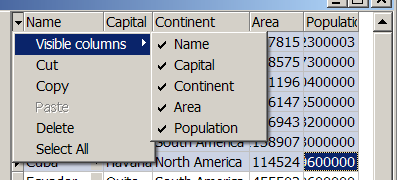
Set TitleButton property to True value to make top-left cell working as button. When TitleButton is True the properties DropdownMenu and UseGlobalMenu are also taken into consideration. If UseGlobalMenu is True then grid will form the dropped down menu using global property DBGridEhCenter.IndicatorTitleMenus. If DropdownMenu is also assigned then all elements of this menu will be added to the dropped down menu after elements of global menu.TDBGridEh.IndicatorTitle property have the following sub-properties:
DropdownMenu: TPopupMenu
ShowDropDownSign: Boolean
TitleButton: Boolean
UseGlobalMenu: Boolean
In forming the pull-down menu to use the properties of the global object - DBGridEhCenter.IndicatorTitleMenus.