
Introduction
Introduction
The Library contains components and classes for:
Embarcadero Delphi(Under the Windows framework - VCL, FMX)Embarcadero C++ Builder(Under the Windows framework - VCL, FMX)Lazarus(Under the Windows and Linux framework - LCL).
The Library is intended to write professional interactive applications that work with the database: rendering tabular information, printing and entering data by the end user.
If you are just starting to learn the library, then start by running and viewing the compiled Demo projects.
You can download the compiled Demo projects from the library's website in the "downloads" section.
The most comprehensive archive application is the EhLibDemos\Bin\MainDemo.Exe application.
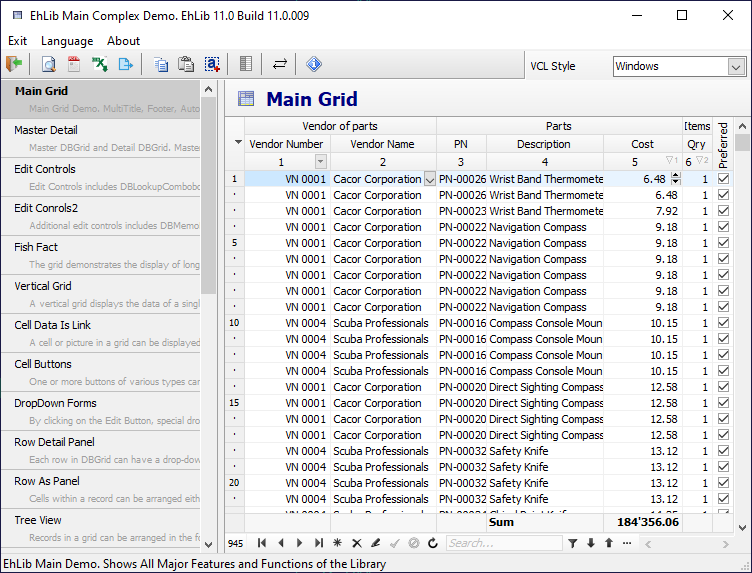
You can also watch video reviews of some of the features of the library in the "EhLib Video" section on YouTube.
If you have already used previous versions of the library, then you can read a summary of new features and changes in the "history" section.
The library includes three main run-time packages:
EhLibRtl- Base Non-visual RunTime library.
This package includes classes and components that cannot be drawn and do not depend on the graphics library. All classes and components of this package are cross-platform. The main component of this package is TMemTableEh.EhLibVcl- Visual RunTime library for VCL framework.
This package includes components and controls based on the VCL graphics library. All classes and components of this package work only under the Windows platform. The main component of this package is the TDBGridEh component.EhLibFmx- Visual RunTime library for FireMonkey framework.
This package includes components and controls based on the FireMonkey graphics library. All classes and components of this package are cross-platform and allow you to develop graphical applications for platforms such as Windows, Android, MacOS, iOS, Linux. The main component of this package is the TDataGridEh component.
The library also includes design-time packages. EhLibInstaller automatically installs all required design-time packages in the IDE.
If you have any problems, you can contact our technical support:
- Through the email support@ehlib.com
- Through the Feedback Form
- Through the Forum forum.ehlib.com
To start using the library, you can download the Evaluation version of the library and install it in the IDE.
To install the library in the IDE, use a special program - installer:.\Installer\EhLibInstaller.exe
You can also install an evaluation version of the library using the GetIt service.
The evaluation version of the library has no usage time limits. When rendering a grid from an evaluation version, a warning about using the evaluation version is displayed at the bottom right of the grid.