
Import/Export grid data
Import/Export TDBGridEh data to/from various formats.
EhLib have a set of functions to export data from DBGridEh to Text, Csv, HTML, RTF, XLS and internal formats. It can write data to stream (TStream object) or to file.
Procedures and classes to import and export data are in module DBGridEhImpExp.
Data Export:
The global procedures SaveDBGridEhToExportFile and WriteDBGridEhToExportStream are used to export data.SaveDBGridEhToExportFile saves data to file. WriteDBGridEhToExportStream saves data to a stream. The ExportClass parameter specifies the class that will be used to export data. The DBGridEh parameter sets the grid to be exported.
For example, you can use the following code to upload data in HTML format:
procedure TfrImportExport.btnExportAsHTMLClick(Sender: TObject);
var
  Path: string;
  FileName: string;
begin
  GetDir(0,Path);
  FileName := Path + '\DBGridEh1Export.Html';

  SaveDBGridEhToExportFile(TDBGridEhExportAsHTML, DBGridEh1, FileName, RBSaveAll.Checked);
  ShellExecute(Handle, nil, PChar(FileName), nil, nil, SW_SHOWNORMAL);
end;
However, this method contains limitations. For example, you cannot specify that you want or do not want to dump the grid header. To solve these problems in EhLib 10.0 for exporting data in text format and in Xlsx format, hotel functions were added.
You can use this generic SaveDBGridEhToExportFile method with the following export classes:
TDBGridEhExportAsHTML – To export in HTML.
TDBGridEhExportAsRTF – To export in RTF format.
TDBGridEhExportAsXMLSpreadsheet – to export data in the format XML Spreadsheet. This format is supported by Microsoft and can be used to transfer data to Microsoft Excel via the clipboard. DBGridEh component is already using this format when writing data to the clipboard, so that data can be transferred from DBGridEh in Microsoft Excel format with preservation of the font, colors and types of data. The implementation of the class is the module DBGridEh XMLSpreadsheetExp.
Deprecated classes:TDBGridEhExportAsText – to export data to a text file or stream. The class is deprecated, use the new SaveDBGridEhToTextFile, WriteDBGridEhToTextStream and WriteDBGridEhToString methods.
TDBGridEhExportAsUnicodeText – To export data to a text file or stream in Unicode format. The class is deprecated, use the new SaveDBGridEhToTextFile, WriteDBGridEhToTextStream and WriteDBGridEhToString methods.
TDBGridEhExportAsCSV – To export data to a delimited text file type ';'. You can change the separator used globally permernnuyu DBGridEhImpExpCsvSeparator or property TDBGridEhExportAsCSV.Separator. The class is deprecated, use the new SaveDBGridEhToTextFile, WriteDBGridEhToTextStream and WriteDBGridEhToString methods.
TDBGridEhExportAsXLS – To export format VCLDBIF (This MS Excel format version 2). In this format there is a limit on the length of text characters. The length can not exceed 255. We do not recommend using this format since it is deprecated.
TDBGridEhExportAsOLEXLS – To export to a format compatible with MS Excel file and use the class TDBGridEhExportAsOLEXLS, TDBGridEhExportAsXlsx or global procedures and ExportDBGridEhToOleExcel ExportDBGridEhToXlsx.
Also for export, you can use a global procedure
function ExportDBGridEhToOleExcel(DBGridEh: TCustomDBGridEh;
  Options: TDBGridEhExportAsOLEXLSOptions; IsSaveAll: Boolean = True): Variant;
TDBGridEhExportAsXlsx – To export data in the format Xlsx. The export is performed directly to a file. The presence of additional libraries are not required. The class is deprecated, use the new ExportDBGridEhToXlsMemFile method.
Export is supported in Delphi XE2 and higher. For working with Export in earlier versions of Delphi you must use the third-party tools to form the Zip file version 2. For more information about unloading format Xlsx for Delphi XE2 version below read in the files section <EhLib Archive>\ ZipProviders\
Also for export, you can use a global procedure
procedure ExportDBGridEhToXlsx(DBGridEh: TCustomDBGridEh;
  const FileName: String;  Options: TDBGridEhExportAsXlsxOptions;
  IsSaveAll: Boolean = True);
Export to Text format:
To export data in text format, we suggest using the new functions SaveDBGridEhToTextFile, WriteDBGridEhToTextStream and WriteDBGridEhToString.
The functions are located in the DBGridEhImpExp module and have the following definition:
procedure SaveDBGridEhToTextFile(DBGridEh: TCustomDBGridEh;
const FileName: String; ExportOptions: TDBGridEhTextExportOptions);procedure WriteDBGridEhToTextStream(DBGridEh: TCustomDBGridEh;
Stream: TStream; ExportOptions: TDBGridEhTextExportOptions);function WriteDBGridEhToString(DBGridEh: TCustomDBGridEh;
ExportOptions: TDBGridEhStringExportOptions): String;TDBGridEhStringExportOptions class contains the following properties:
property ExportSelecting: Boolean;
property CellDelimiter: String;
property LineDelimiter: String;
property TrailingLineDelimiter: Boolean;
property QuoteChar: Char;
property IsExportTitle: Boolean;
property IsExportFooter: Boolean;
property UseEditFormat: Boolean;
property FormatSettings: TFormatSettings;
property UseFormatSettings: Boolean;
property ExportColumns: TColumnsEhList;
The TDBGridEhTextExportOptions class inherits from the TDBGridEhStringExportOptions class and has the following additional properties.
property Encoding: TEncoding;
property WriteBOM: Boolean;
Set the property to True to indicate to the algorithm that when writing data to a stream, a Byte Order Mark must be written to the beginning of the stream, which contains the encoding code in which the text data was written. For a description of the Byte Order Mark, see here:
The simplest call to the SaveDBGridEhToTextFile procedure looks like this:
procedure TfrImportExport.btnExportAsTxtClick(Sender: TObject);
var
  Path: string;
  FileName: string;
  ExportOptions: TDBGridEhTextExportOptions;
begin

  ExportOptions := TDBGridEhTextExportOptions.Create;
  ExportOptions.IsExportTitle := True;
  ExportOptions.IsExportFooter := False;
  ExportOptions.Encoding := TEncoding.UTF8;
  ExportOptions.WriteBOM := True;
  ExportOptions.QuoteChar := '"';
  ExportOptions.CellDelimiter :=  #09;
  ExportOptions.TrailingLineDelimiter := True;
  ExportOptions.UseEditFormat := False;

  GetDir(0,Path);
  FileName := Path + '\DBGridEh1Export.Txt';

  SaveDBGridEhToTextFile(DBGridEh1, FileName, ExportOptions);
  ExportOptions.Free;

  ShellExecute(Handle, nil, PChar(FileName), nil, nil, SW_SHOWNORMAL);
end;
In this example, before calling the SaveDBGridEhToTextFile procedure, the TDBGridEhTextExportOptions class is created in which the settings for exporting grid data are written.
The TDBGridEhTextExportOptions class has extensive properties with which to control the size of the data export format.
An example of using classes to export data to a text view can be found in the Demos\MainDemo Demo project.
Export to Xlsx format:
In version 9.5 there was a function for unloading DBGridEh into an Xlsx file with the following parameters:
procedure ExportDBGridEhToXlsx(
  DBGridEh: TCustomDBGridEh;
  const FileName: String;
  Options: TDBGridEhExportAsXlsxOptions;
  IsSaveAll: Boolean = True);
Where Options is a combination of values
xlsxColoredEh Export cell and background colors.
xlsxDataAsDisplayText Unload all cell values as text.
xlsxDataAsEditText Unload all cell values as text. Use text in edit mode. Those. don't use DisplayFormat.
We recommend using the new functions for uploading data to an Xlsx file with the following definition.
procedure ExportDBGridEhToXlsx(
  DBGridEh: TCustomDBGridEh;
  const FileName: String;
  ExportOptions: TDBGridEhXlsMemFileExportOptions); overload;
procedure ExportDBGridEhToXlsx(
DBGridEh: TCustomDBGridEh;
const FileName: String;
ExportOptions: TDBGridEhXlsMemFileExportOptions;
ExporterClass: TDBGridEhToXlsMemFileExporterClass); overload;The new version of the procedure uses the ExportOptions parameter of type TDBGridEhXlsMemFileExportOptions instead of the Options parameter.
The TDBGridEhXlsMemFileExportOptions class contains the following properties:
property IsExportSelecting: Boolean
property ExportColumns: TColumnsEhList
property IsExportTitle: Boolean
property IsExportFooter: Boolean
property IsExportFontFormat: Boolean
property IsExportFillColor: Boolean
property IsExportCellFormat: Boolean
property IsExportDisplayFormat: Boolean
property IsCreateAutoFilter: Boolean
property IsExportFreezeZones: Boolean
property IsFooterSumsAsFormula: Boolean
property IsExportDataGrouping: Boolean
property GridHeaderText: String
property GridHeaderFont: TFont;
property GridHeaderFontStored: Boolean;
property GridFooterText: String;
property GridFooterFont: TFont;
property GridFooterFontStored: Boolean;
property SheetName: String;
Parameter ExporterClass: TDBGridEhToXlsMemFileExporterClass
This parameter must point to a class inherited from TDBGridEhToXlsMemFileExporter. Calling the ExportDBGridEhToXlsx procedure with the given parameters should be used when it is necessary to change the export algorithm or formatting details when exporting data from DBGridEh to an Xlsx file. Before calling the procedure, write an inheritor from the TDBGridEhToXlsMemFileExporter class and override the necessary virtual functions responsible for the necessary export details. When calling the ExportDBGridEhToXlsx procedure, pass a pointer to the inherited class. The procedure will create an instance of the specified class and will use it to export data.
Here is an example of calling the ExportDBGridEhToXlsx procedure without the ExporterClass parameter:
procedure TForm1.actExportToExcelExecute(Sender: TObject);
var
  Grid: TDBGridEh;
  Path: String;
  FileName: String;
  ExportOptions: TDBGridEhXlsMemFileExportOptions;
begin
  Grid := TDBGridEh(ActiveControl);

  GetDir(0, Path);
  FileName := Path + '\DBGridEhAsXlsx.Xlsx';

  ExportOptions := TDBGridEhXlsMemFileExportOptions.Create;
  ExportOptions.IsExportAll := True;
  ExportOptions.IsExportTitle := True;
  ExportOptions.IsExportFooter := True;
  ExportOptions.IsExportFontFormat := True;
  ExportOptions.IsExportFillColor := True;
  ExportOptions.IsCreateAutoFilter := True;
  ExportOptions.IsExportFreezeZones := True;
  ExportOptions.IsFooterSumsAsFormula := True;
  ExportOptions.IsExportDisplayFormat := True;
  ExportOptions.IsExportDataGrouping := True;
  ExportOptions.SheetName := 'Text';

  ExportOptions.GridHeaderText := 'GridHeaderText';
  ExportOptions.GridHeaderFont := Grid.Font;
  ExportOptions.GridHeaderFont.Size := 24;

  ExportOptions.GridFooterText := 'GridFooterText'

  ExportDBGridEhToXlsx(Grid, FileName, ExportOptions);

  ExportOptions.Free;

  ShellExecute(Handle, nil, PChar(FileName), nil, nil, SW_SHOWNORMAL);
end;
Data export result: Screenshort
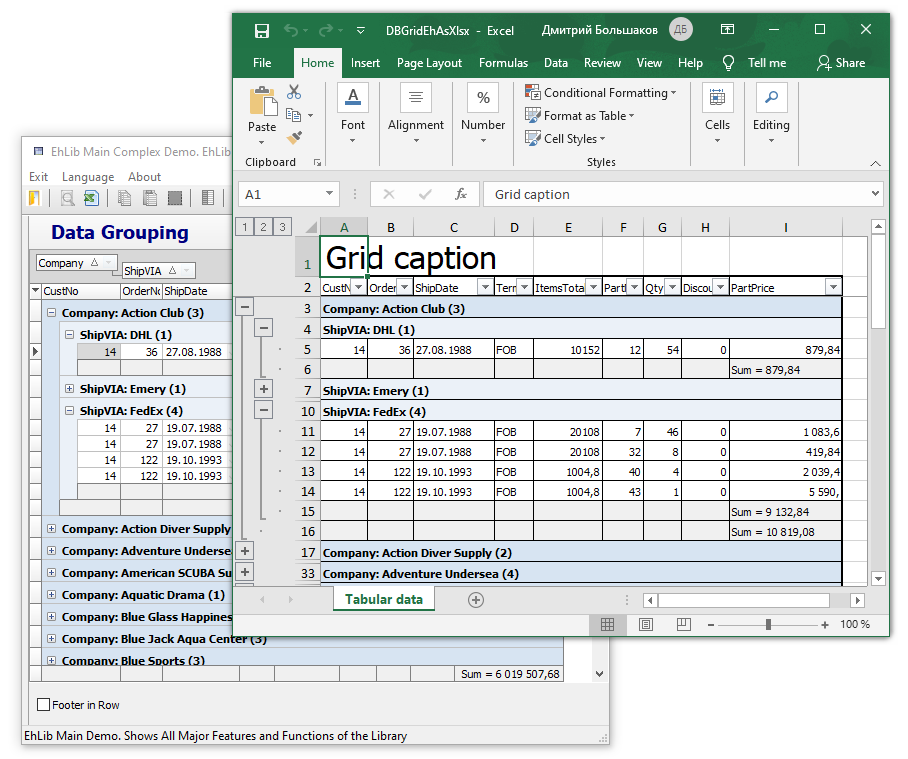
The new version also adds procedures for unloading data into the intermediate TXlsMemFileEh object.
procedure ExportDBGridEhToXlsMemFile(
  DBGridEh: TCustomDBGridEh;
  XlsFile: TXlsMemFileEh;
  ExportOptions: TDBGridEhXlsMemFileExportOptions);
procedure ExportDBGridEhToXlsMemFile(
DBGridEh: TCustomDBGridEh;
XlsFile: TXlsMemFileEh;
ExportOptions: TDBGridEhXlsMemFileExportOptions;
ExporterClass: TDBGridEhToXlsMemFileExporterClass);You can use these functions to unload data first into an object of type TXlsMemFileEh, note to make additional changes in the XlsMemFile object, and after that save the data to a file on disk.
Exporting data from DBGridEh to TXlsMemFileEh using the TDBGridEhToXlsMemFileExporter class.
By using the TDBGridEhToXlsMemFileExporter class directly, you gain even more flexibility when exporting data to an XlsMemFile and then saving the data to an Xlsx file.
For example, the TDBGridEhToXlsMemFileExporter class has properties such as Worksheet, FromCol, and FromRow. Using the Worksheet property, you can specify which specific workbook to export to. The FromCol and FromRow properties set the starting column and row from which to start generating the export data.
Having written an inheritor from TDBGridEhToXlsMemFileExporter, you can overload the virtual methods of the class to change the format of data export.
Below is the implementation of the ExportDBGridEhToXlsMemFile procedure, which you can understand how to use the TDBGridEhToXlsMemFileExporter class.
procedure ExportDBGridEhToXlsMemFile(
  DBGridEh: TCustomDBGridEh;
  XlsFile: TXlsMemFileEh;
  ExportOptions: TDBGridEhXlsMemFileExportOptions;
  ExporterClass: TDBGridEhToXlsMemFileExporterClass);
var
Exporter: TDBGridEhToXlsMemFileExporter;
begin
if ExporterClass <> nil
then Exporter := ExporterClass.Create
else Exporter := TDBGridEhToXlsMemFileExporter.Create;
Exporter.XlsFile := XlsFile;
Exporter.Grid := DBGridEh;
if ExportOptions <> nil then
Exporter.ExportOptions := ExportOptions;
Exporter.ExportGrid;
Exporter.Free;
end;Here in the code:
If ExporterClass is not specified, then the default TDBGridEhToXlsMemFileExporter class is used.
The XlsFile, DBGridEh and ExportOptions object is assigned.Exporter.ExportGrid method exports data.
Once exported, the Exporter object is no longer needed and is removed. The generated data remains in the XlsFile class.
The TDBGridEhToXlsMemFileExporter.Worksheet property is not assigned to the code. Therefore, the Exporter renders data on the first workbook from the Workbook.Worksheets collection.
Data Import:
To import data, you can use the following classes:
TDBGridEhImportAsText
TDBGridEhImportAsUnicodeText
TDBGridEhImportAsVCLDBIF