
Row as panel
Grid row as Panel mode
Grid can work in special mode when every cell of grid can be placed under each other and can have individual height. Set RowPanel.Active to True value to activate this mode. At design-time you can place cell, vertical and horizontal size. At run-time the possibility to change position of cell depends on the presence dghColumnMove value in OptionsEh property. Possibility to change vertical size of cell depends on RowSizingAllowed property.
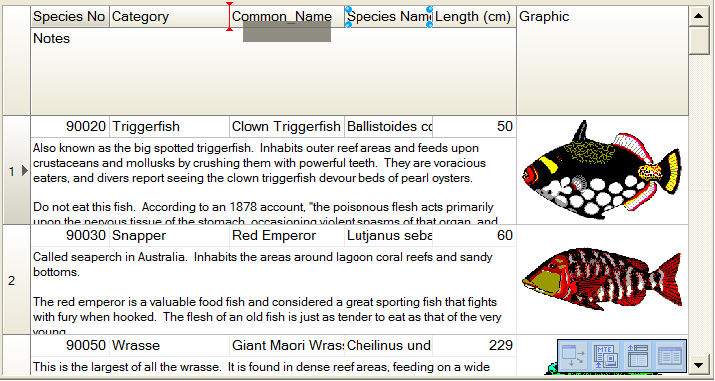
When user change cell width, the grid also changes width of adjoined cells which are placed under or above of changing cell and if the right border of these cells match. By analogy when user changes cell height, grid changes height of cells in left or right part of grid if low borders march. Press and hold Shift key to change the size of only single cell.
To change cell height of cell you need to move mouse cursor to the low border of the title cell. Mouse cursor will change its image from arrow to two arrows with up and down direction. At this moment press right mouse button and change size.
To change position of cell you need to press right mouse button on the title cell and drag it to the required place.
Additional subproperies of the RowPanel property:
NavKeysNavigationType: TGridRowPanelNavKeysNavigationTypeEh defines the order of navigation over cells in the grid when keys Up, Down, Left, Right are pressed.
rpntRowToRowEh - (by default) Keys Up, Down move current cell to next or previous record of dataset. Keys Left, Right works as Tab and Shift-Tab.
rpntCellToCellEh - Keys Up, Down move current cell to under or above last position from the current cell. Keys Left, Right move current cell to left or right position from the current cell.
TabNavigationType: TGridRowPanelTabNavigationTypeEh defines an order of going through cells of the grid by Tab key
rpntUpToDownPriorityEh Go, at first, from top to bottom, than from left to right.
rpntLeftToRightPriorityEh Go, at first, from left to right, than from top to bottom.
In the current implementation, the RowPanel mode is not compatible with the MultiTitle header mode.
If RowPanel is enabled, then MultiTitle headers are disabled automatically.