
Graphical background
Less than 1 minute
Display graphic in grid background
DBGridEh lets you display a static image (type TPicture) in the background of the client area of the grid.
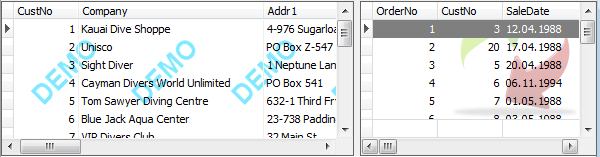
To customize the display graphic background use BackgroundData properties DBGridEh.BackgroundData.DBGridEh.BackgroundData: TDBGridBackgroundDataEh
Visible: Boolean
Specifies whether the Background Pciture is visible in the grid.
Picture: TPicture
The Pciture to draw as a Background Data.
Placement: TImagePlacementEh
ImagePlacementEh = (ipTopLeftEh, ipTopCenterEh, ipTopRightEh, ipCenterLeftEh, ipCenterCenterEh, ipCenterRightEh, ipBottomLeftEh, ipBottomCenterEh, ipBottomRightEh, ipFillEh, ipFitEh, ipStretchEh, ipTileEh);
Specifies the position of the image and the way of filling the free space
HorzMargin: Integer
Horizontal Shift
VertMargin: Integer
Vertical Shift
ExcludeTitle: Boolean
Delete the title of the fill graphic background.
ExcludeIndicator: Boolean
Delete button from the fill graphic background.
ExcludeFooter: Boolean
Delete the footer of the fill graphic background.