
Brief description
Brief description of TDBGridEh
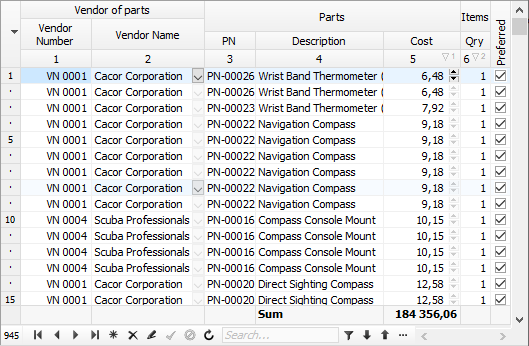
TDBGridEh displays and manipulates records from a dataset in a tabular grid.
TDBGridEh is very similar to the standard TDBGrid component, but TDBGridEh does not inherit from TDBGrid or TCustomDBGrid.
The TDBGridEh inheritance tree looks like this:
TWinControl
TCustomControl
TCustomControlEh
TCustomGridEh
TCustomDBAxisGridEh
TCustomDBGridEh
TDBGridEh supports all the features of the TDBGrid component and also includes many additional features.
Some features of TDBGridEh only work when the grid is connected to a DataSet of type TMemTableEh. TMemTableEh is a DataSet that contains all the records in the computer's memory and is not connected directly to the database. TMemTableEh can be connected to other DataSets that can connect to the database. When working in conjunction with TDBGridEh-TMemTableEh-TDataSetDriverEh-<Your Dataset>, you will be able to work in the database and use all the features of TDBGridEh that it has when working with TMemTableEh.
When TDBGridEh is connected to TMemTableEh, then TDBGridEh has the following additional features such as:
- Ability to scroll the grid through a vertical scrollbar without changing the current record
- Ability to create virtual group entries that appear as one wide entry in the grid. Group entries are created based on the repeated values of entries in a particular column.
- Possibility to build a list of unique values in drop-down filtering lists.
- Possibility to display data in the form of a tree. The tree structure is configured in the TMemTableEh component.
TDBGridEh does not store data in itself, it only displays the data of a TDataSet via a TDataLink object. Each DataSet component has an internal TDataLink object. You can connect TDBGridEh to a DataSet using an additional TDataSource object and the TDBGridEh.DataSource property. By itself, the intermediate TDataSource object carries little semantic load when interacting with DBGridEh and DataSet. It will rarely be mentioned in the documentation. If you have already used the TStringGrid component, you may have noticed that the data displayed in TStringGrid and TDBGridEh are very similar, but the mechanisms that are used to display data in TStringGrid and TDBGridEh are completely different. In TStringGrid the total number of grid rows is equal to the number of data rows in the array, while in TDBGridEh (and TDBGrid) the number of rows is never greater than the number of visible rows. While the vertical ScrollBar can display position relative to the total number of records in the DataSet, it takes its position data not from the grid's cell array, but directly from the DataSet (DataSet.RecNo). A similar feature or flaw has been fixed in the DataSet of the TMemTableEh type, but, in general, it is preserved for other types of DataSets that you will work with.
TDataSet does not allow you to work with data as with an array of data, for example, it is impossible to immediately get the field value by the record index. Also, some types of DataSets don't even have the concept of a record number (DataSet.RecNo). In such DataSets, we can only know when we are at the beginning, or at the end of the DataSet, or somewhere in between, and in this case, the DBGrid only shows a vertical ScrollBar in 3 positions (in TDBGridEh to work with such DataSets' You can activate the SumList object and set the SumList.VirtualRecords property to True). To be able to display multiple records at the same time, the TDataLink object uses a record buffer window with fast read-only access. DBGrid takes advantage of this DataLink feature and sets the size of the record buffer window to the number of possible visible grid rows. DataLink does not allow to define from what record in DataSet this buffer is filled. The DataLink itself scrolls the contents of the record buffer window as we move through the DataSet (Next, Prior) so that the active record always remains inside the record buffer window. This is the reason why the active entry changes position when users change the ScrollBar position with the mouse.