
SearchPanel
Less than 1 minute
DBVertGridEh.SearchPanel
DBVertGridEh allows to search data in one record of DataSet via SearchPanel, as is done in TDBGridEh.
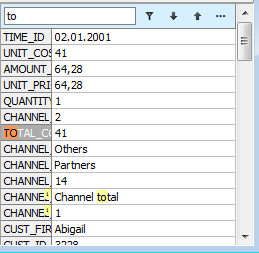
TDBVertGridEh have a SearchPanel property with next sub properties:
Enabled: Boolean;
Search Panel is available in DBVertGridEh. The Search Panel can be hidden for the user if PersistentShowing = False.
FilterEnabled: Boolean;
Specifies that Search Panel results can be filtered.
FilterOnTyping: Boolean;
Specifies that filtering must be performed as a text is being typed in the Search Panel editor.
PersistentShowing: Boolean;
Specifies that SearchPanel is always visible in TDBVertGridEh. If PersistentShowing = False, the user can display and activate SearchPanel by pressing the key combination defined by a ShortCut property.
ShortCut: TShortCut
Sets the key combination by which a focus transfer to the Search Panel text editor.
CaseSensitive: Boolean
Specifies the text case sensitivity when searching via Search Panel.
WholeWords: Boolean
Specifies that the search must be performed by the whole words when searching via Search Panel.