
MRUList
Working with lists MRUList (last entry list)
All editing control, as well as classes in the grid columns TColumnEh (For DBGridEh) and TFieldRow (For DBVerGridEh) contain a MRUList property.
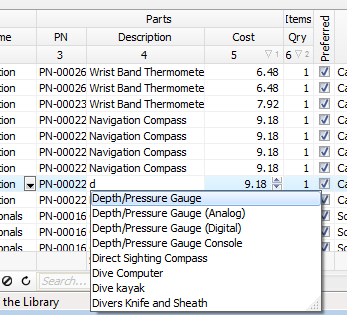
This feature is designed to manage a list of the last entries. When you start typing in a text editor, the system displays a list of recently entered values and offers to choose from a list of one of the values to not gain it fully again.

MRUList starts only after activation. To activate MRUList set MRUList.Active property to True.
You can complete the list of initial values, using the MRUList.Items property of TStrings type. When MRUList active and filled the Items property values, the text editor will display a special list editor under control, offering to choose one of the existing values list. At the same list of values will be limited to only those lines, the values that begin with the string contained in the editor. For a complete list of values, delete the text in the editor and press VK_BACK.
The list of MRUList values can be formed automatically on the basis of a list of unique values in the DataSet. To specify that the data should be taken from the DataSet set MRUList.ListSourceKind property to lskDataSetFieldValuesEh.
Not all DataSets support access to the internal data structure for a list of unique values of a column.
In the current version of the library MRUList.ListSourceKind = lskDataSetFieldValuesEh mode works for DataSet of TMemTableEh type. In one of the unit for your project it is necessary to add a EhLibVclMTE module in the uses clause. This module contains a class that is able get unique values for a field.
If your DataSet supports the ability to get a list of unique values for a field, then you can write and register your class inherited from TDatasetFeaturesEh. In the implementation of the class it must written a FillFieldUniqueValues method. See the example of the implementation in the EhLibVclMTE.Pas file.
The TMRUListEh class contains the following properties:
property AutoAdd: Boolean
property Active: Boolean
property CaseSensitive: Boolean
property Items: TStrings
property Limit: Integer
property Rows: Integer
property ListSourceKind: TMRUListSourceKindEh
Defines a kind of source data for MRU DropDown list.
lskMRUListItemsEh – source data for DropDown list will be taken from Items property.
lskDataSetFieldValuesEh – source data for DropDown list will be taken from DataSet. For DataSet a TDatasetFeaturesEh class must be registered with implementing of FillFieldUniqueValues method to list of unique values for a dataset field.