
What's new in EhLib.VCL 10.2
What's new in EhLib.VCL 10.2
Support for Delphi versions 7, 2005, 2006 and 2007 has been discontinued
EhLib.VCL version 10.2 no longer supports Delphi versions 7, 2005, 2006 and 2007.
There is support for all versions from Delphi 2009 and up, including support for C++Builder and Lazarus 2.2 on Windows and Linux.
Design-Time edit windows added for TMemTableEh и TDBGridEh components under Lazarus IDE.
Design-Time edit windows added for TMemTableEh и TDBGridEh components under Lazarus IDE.
Now developers can create structure of the table and data records for TMemTableEh at design-time.
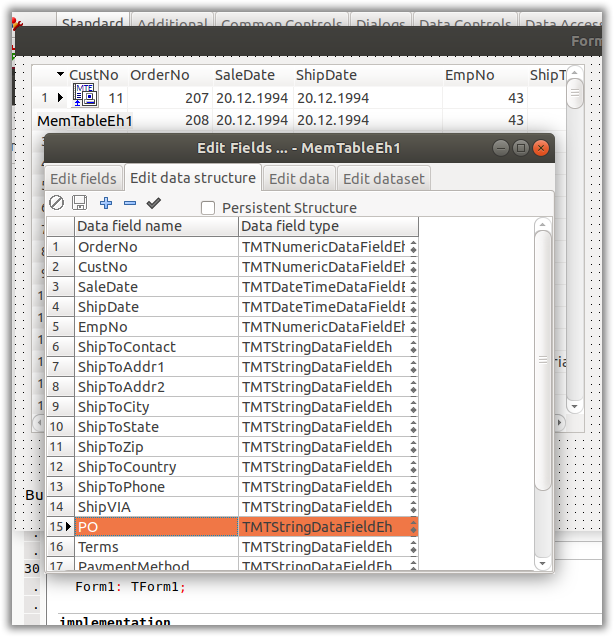
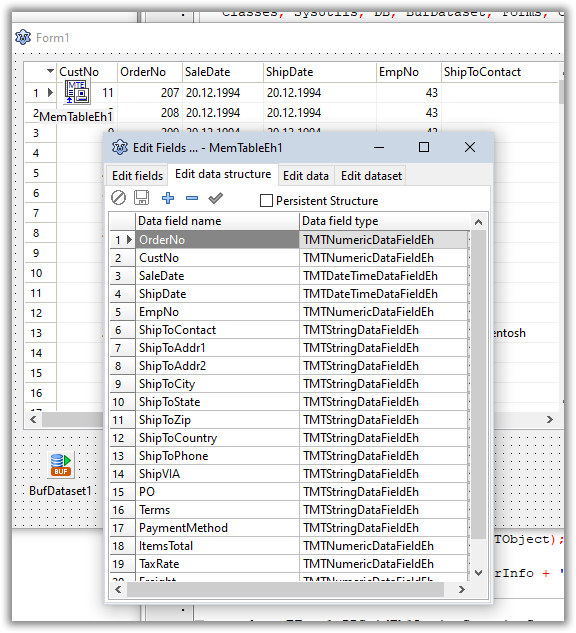
Design-time editing windows work under Windows and Linux versions of Lazarus IDE.
Support for printing and export to PDF file.
Added support for printing and exporting library components to Pdf (Portable Document Format).
An example of using the functionality of uploading data to pdf can be found in the Demo project MainDemo.
The button “Export to pdf” has been added to the Demo project
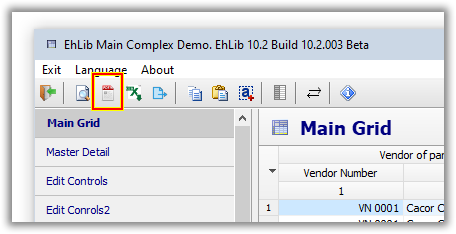
Export to PDF of the following components is supported:
- TDBGridEh
- TDBVertGridEh
- TPivotGridEh
- TPLannerEh
To export data to pdf, the same classes are used that are used to print components.
- For TDBGridEh, this is the TPrintDBGridEh class.
- For TDBVertGridEh, this is the TDBVertGridPrintServiceEh class.
- For TPivotGridEh, this is the TPivotGridPrintServiceEh class.
- For TPLannerEh, this is the TPlannerControlPrintServiceEh class.
Below is a description of the methods for exporting components to pdf:
procedure TPrintDBGridEh.PrintToPdfFile(AFileName: String);The TPrintDBGridEh class method is used to export data from to pdf format. The data generation algorithm is similar to the algorithm for printing the TDBGridEh component using the TPrintDBGridEh component.
In the AFileName parameter, you must pass the full path and name of the pdf file to be generated.
procedure TBasePrintServiceComponentEh.PrintToPdfFile(AFileName: String);The TBasePrintServiceComponentEh class method is used to export data from to pdf format. The data generation algorithm is similar to the algorithm for printing the TDBVertGridEh, TPivotGridEh and TPlannerEh component components using classes derived from TBasePrintServiceComponentEh.
In the AFileName parameter, you must pass the full path and name of the pdf file to be generated.
Below is an example of the code with which the components are exported to a pdf file:
procedure TForm1.actExportToPdfExecute(Sender: TObject);
var
  AFilename: String;
  Path: String;
  FullFileName1: String;
  FullFileName2: String;
begin
  GetDir(0, Path);

  //PrintDBGridEh1.PrintToPdfFile(FullFileName1);
  if ActiveControl is TCustomDBGridEh then
  begin
    AFilename := 'DBGridEhAsPdf.pdf';
    FullFileName1 := Path + '\' + AFilename;
    PrintDBGridEh1.DBGridEh := TDBGridEh(ActiveControl);
    PrintDBGridEh1.PrintToPdfFile(FullFileName1);
  end else if ActiveControl is TCustomDBVertGridEh then
  begin
    AFilename := 'DBVertGridEhAsPdf.pdf';
    FullFileName1 := Path + '\' + AFilename;
    TCustomDBVertGridEh(ActiveControl).PrintService.PrintToPdfFile(FullFileName1);
  end else if ActiveControl is TCustomPlannerViewEh then
  begin
    AFilename := 'PlannerViewAsPdf.pdf';
    FullFileName1 := Path + '\' + AFilename;
    TCustomPlannerViewEh(ActiveControl).PlannerControl.PrintService.PrintToPdfFile(FullFileName1);
  end else if ActiveControl is TPivotGridEh then
  begin
    AFilename := 'PivotGridEhAsPdf.pdf';
    FullFileName1 := Path + '\' + AFilename;
    TPivotGridEh(ActiveControl).PrintService.PrintToPdfFile(FullFileName1);
  end
  else
  begin
    Exit;
  end;

  FullFileName2 := Path + '\' + AFilename + '.Txt';
  CopyFile(PChar(FullFileName1), PChar(FullFileName2), false);
  // ...and start a viewer.
  ShellExecute(Handle, nil, PChar(FullFileName1), nil, nil, SW_SHOWNORMAL);
end;
Export to pdf is supported in all versions of Delphi under VCL and in Lazarus under Windows.
Others
Limit on the number of selected DBGridEh.STFilter values
In DBGridEh.STFilter, a limit on the number of selected values in the drop-down list has been added. The limitation is related to the peculiarities of the local filter in TDataSet. When connecting DBGridEh to a TDataSet of type TMemTable, local filtering through STFilter is subject to a limit of 1000 records. You can set the limit using the EhLibMTE.LocalFilterListValuesLimit property. To set similar limits in other types of TDataSets, override the TDatasetFeaturesEh.GetFilterListValuesLimit method in the overridden TDatasetFeaturesEh class.
Automatic selection of values in the DBGridEh.STFilter drop-down list when searching through the search bar
When searching for values through the search string in the DBGridEh.STFilter drop-down window, the algorithm automatically selects the found values so that the user does not need to click the "Select All" checkbox to filter the found values, but immediately press "Enter" or the "OK" button.
In the DBGridEh.STFilter drop-down list, when pressing the key combination Ctrl+C, the value from the clipboard is automatically entered into the value search field and the search is performed.
Added field FilterListValuesLimitExceeded to EhLibLanguageConstsFilterListValuesLimitExceeded = 'Too many values selected.'#13#10'The number of selected values cannot exceed %d'.