Planner item hints
Less than 1 minute
Show Hint Window for planner Items
There are event in the PlannerView to set data for hint window (Hints) that appear when mouse you hover over the event item area.
OnSpanItemHintShow: TPlannerViewSpanItemHintShowEventEhWrite the event handler to change text, font or background color.
The hint window is appeared when a mouse moves and hold over the event area (TPlannerDataItemEh).
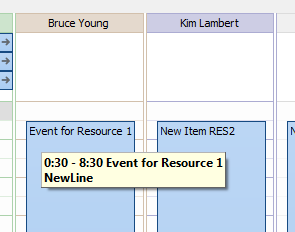
In the below example the OnSpanItemHintShow handler adds a new line with text 'NewLine' and sets the hint font in bold style.
procedure TfrFrameOne.PlannerDayViewEh1SpanItemHintShow(
  PlannerControl: TPlannerControlEh; PlannerView: TCustomPlannerViewEh;
  CursorPos: TPoint; SpanRect: TRect; InSpanCursorPos: TPoint;
  SpanItem: TTimeSpanDisplayItemEh; Params: TPlannerViewSpanHintParamsEh;
  var Processed: Boolean);
begin
  PlannerControl.DefaultFillSpanItemHintShowParams(PlannerView,
    CursorPos, SpanRect, InSpanCursorPos, SpanItem, Params);
  Params.HintStr := Params.HintStr + sLineBreak + 'NewLine';
  Params.HintFont.Style := Params.HintFont.Style + [fsBold];
  Processed := True;
end;
On the screen the hint will appear as follows: