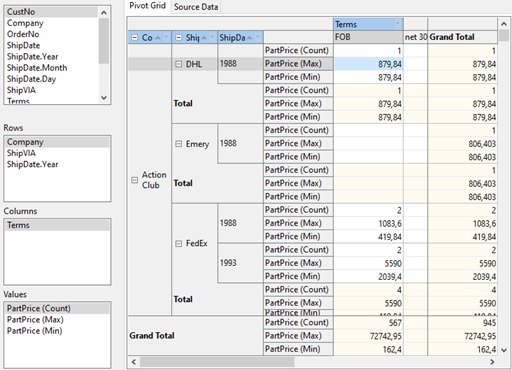
The main properties of the TPivotGridEh class
The main properties of the TPivotGridEh class
property ActualColFlds: TStringList;
property ActualRowFlds: TStringList;
property ActualValueFields: TValueFieldsCollectionEh;
property ColsAxisTree: TPivotAxisGroupingTreeEh;
property DataBuildingProgressDelay: Integer default 1000;
property DefaultColWidth: Integer default 80;
property DefaultDateTimeSliceLevels: TDateTimeSliceLevelsEh read default [dtslYearEh, dtslMonthEh, dtslDayEh];
property GridCellParams: TPivotGridCellParamsEh;
property GridLineParams: TPivotGridLineParamsEh;
property Options: TPivotGridOptionsEh default [pgoColSizingEh, pgoEditingEh, pgoWantTabEh, pgoFieldDraggingEh, pgoGrandTotalColumnEh, pgoGrandTotalRowEh, pgoDataSortingEh, pgoDataFiltersEh];
Sets the values that affect various aspects of grid behavior.
pgoRowSizingEh
Allow the user to change the height of the rows with the mouse.
pgoColSizingEh
Allow the user the width of the columns with the mouse.
pgoEditingEh
Allow the user to edit the data in the grid. For details on editing data, see "Editing cells in TPivotGridEh".
pgoWantTabEh
The Tab key is processed inside the grid to go to the next cell.
pgoFieldDraggingEh,
Allow the user to drag the fields in the Grid with the mouse....
pgoGrandTotalColumnEh
Display the column of total amounts.
pgoGrandTotalRowEh
Display the row for total amounts.
pgoDataSortingEh
Allow the user to sort the data by clicking on the field headers.
pgoDataFiltersEh
Allow the user to filter the data by clicking on the opening section of the drop-down form to filter the data in the field headers.
property PivotDataSource: TPivotDataSourceEh;
property PivotFields: TPivotFieldsEh;
property RowAggrBeforeData: Boolean;
property RowHeight: Integer;
property RowLines: Integer;
property RowsAxisTree: TPivotAxisGroupingTreeEh;
property ShowDataBuildingProgress: Boolean default True;
property ShowHint: Boolean stored IsShowHintStored;
property ShowToolTips: Boolean;
property VisPivotGridArray[ACol, ARow: Integer]: TPivotCellEh;
property PrintService: TCustomPivotGridPrintServiceEh;
Wraping text in Axis area
To enable text wrapping in cells, set the TPivotGridEh.RowAxisOptions.AutoWordWrap property for row axis cells or TPivotGridEh.ColumnAxisOptions.AutoWordWrap for column axis cells.
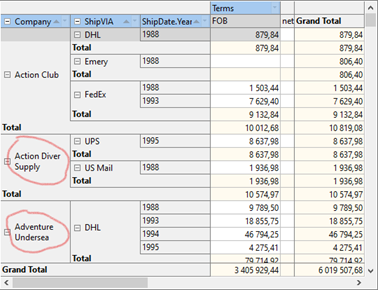
Display Total cells at the level of Child elements.
To activate the display mode of Total cells at the level of Child elements, set the TPivotGridEh.RowAxisOptions.TotalAtParentLevel property to False for row axis cells or TPivotGridEh.ColumnAxisOptions.TotalAtParentLevel to False for column axis cells.
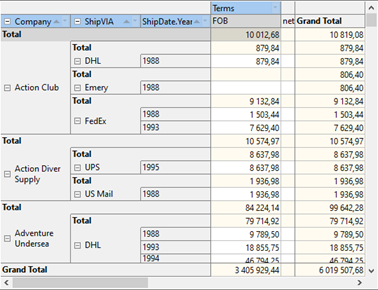
Display Total cells before cells with data.
To activate the mode of displaying Total cells before cells with data, set the TPivotGridEh.RowAxisOptions.TotalsBeforeData property to True for row axis cells, or TPivotGridEh.ColumnAxisOptions.TotalsBeforeData property to True for column axis cells.
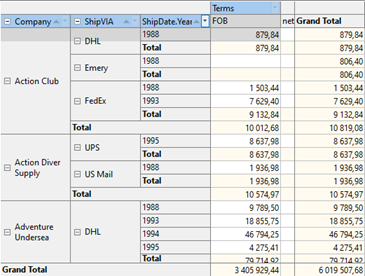
Automatically increase the height of the cell to fit all the text in the cell
To activate the automatic grid height increase mode, set the TPivotGridEh.RowAxisOptions.HeightAutoExpand property to True for row axis cells or TPivotGridEh.ColumnAxisOptions.HeightAutoExpand to True for column axis cells.
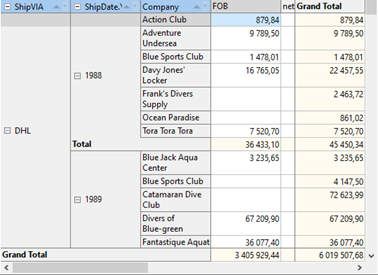
Arrange multiple data cells in a vertical row section
To activate the mode of arranging multiple cells with data (when the TPivotDataSourceEh.ValueFieldDefs collection contains multiple values) vertically, set the pgoMultiValuesInRowsAxisEh value in the TPivotGridEh.Options property.