
What's New in EhLib.VclFmx 13.0
What's New in EhLib.VclFmx 13.0
Added support for data grouping in Fmx.TDataGridEh
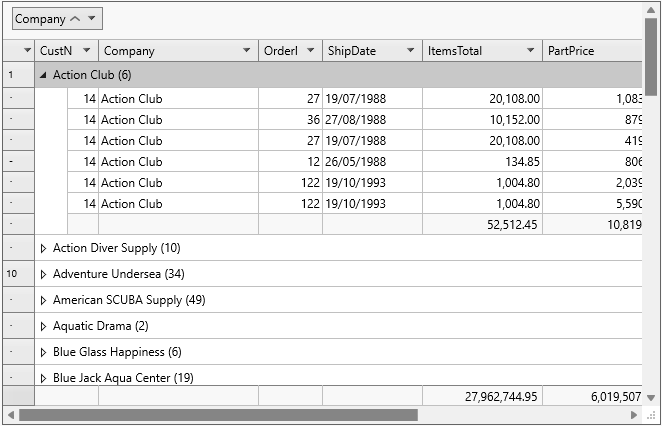
To configure grouping, use the subproperties of the TDataGridEh.DataGrouping property.
To create a grouping at design time, follow these steps:
- Create static columns in the grid.
- On the form, select your
TDataGridEhand in the Object Inspector, select theTDataGridEh.DataGrouping.GroupDescriptions property. - Open the grouping descriptions collection and create items in the
TDataGridGroupDescriptionEhcollection. - For each item in the GroupDescriptions collection, set the Column property to define the fields by which records in the grid will be grouped.
The TDataGridEh.DataGrouping property is of type TDataGridDataGroupingEh and contains the following properties:
???
Added support for FMX styles
Support for Fmx styles has been added to the library.

In Vcl.TDBGridEh, the global Popup menu for data cells and header cells has been expanded
The current version now allows you to activate the Vcl.TDBGridEh.PopupMenuParams.BuildMenuOnPopup and Vcl.TDBGridEh.PopupMenuParams.UseGlobalMenu properties.
The TDBGridEh.PopupMenuParams.BuildMenuOnPopup property enables the ability to combine the grid's global menu and the menu set via TColumnEh.PopupMenu into a single list before displaying the Popup menu for a grid cell.
The TDBGridEh.PopupMenuParams.UseGlobalMenu property enables the ability to create a single menu for all grids in a project when the Popup menu is displayed for grid header cells and grid data cells. To enable the TDBGridEh.PopupMenuParams.BuildMenuOnPopup property for all grids in your project, set the global DBGridEhCenter.BuildMenuOnPopup property to True in your main form's initialization code.
To enable the TDBGridEh.PopupMenuParams.UseGlobalMenu property for all grids in your project, set the global DBGridEhCenter.UseGlobalPopupMenu property to True in your main form's initialization code.
Right-clicking over a header cell displays a popup menu with the following items.
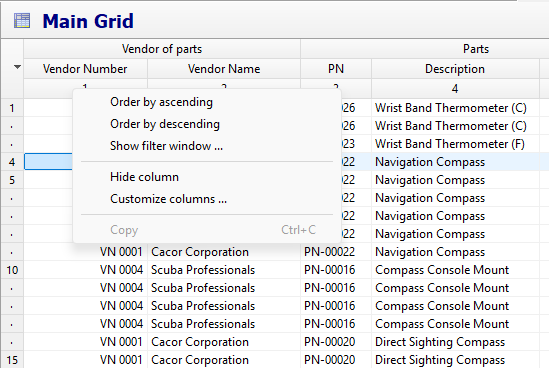
Menu items may be unavailable or invisible if they are irrelevant to the current grid settings. For example, the "Order by ascending" menu item is hidden if the dghAutoSortMarking property is not set in the grid.
When you right-click over a data cell, the grid displays a popup menu with the following items.
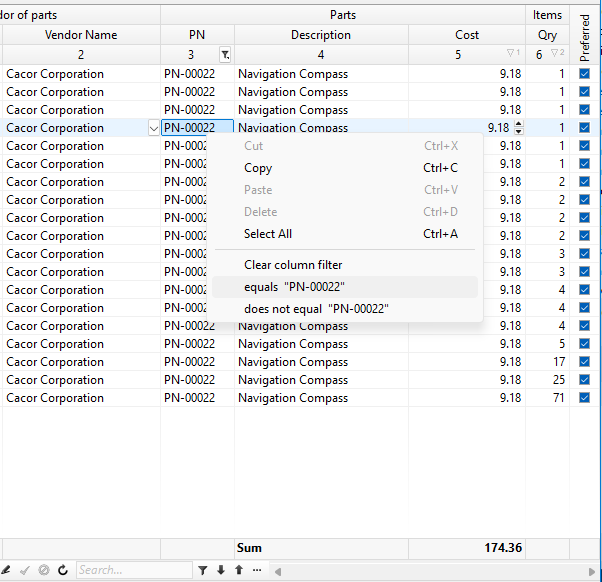
This version adds menu items for filtering data by the value of the currently selected grid cell.
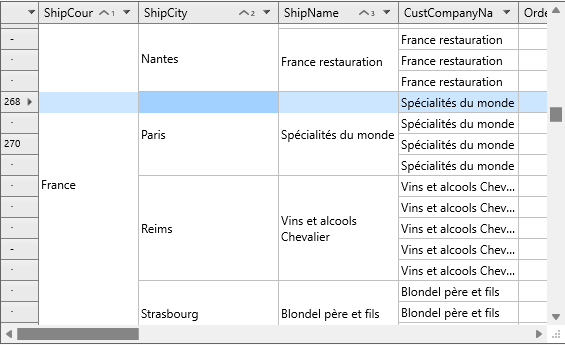
Fmx.TDataGridEh.MergeDuplicates
In Fmx.TDataGridEh, the MergeDuplicates property of the Boolean type has been added to the TDataGridBaseColumnEh class.
When this property is set to True, TDataGridEh displays the values in the column visually merging duplicate values.
Changes in names of modules, classes and types:
- The
PdfElemetsEhmodule has been renamed toPdfElementsEh. - The TPlannerStateEh.
psSpanButtomSizingEhtype has been renamed toTPlannerStateEh.psSpanBottomSizingEh. - The
TAxisTimeBandOreintationEhtype has been renamed toTAxisTimeBandOrientationEh.